
KokoroGUI
A local text-to-speech editor with Kokoro voices, Audio8 voice cloning and a multitrack mixer for Windows, macOS and Linux.
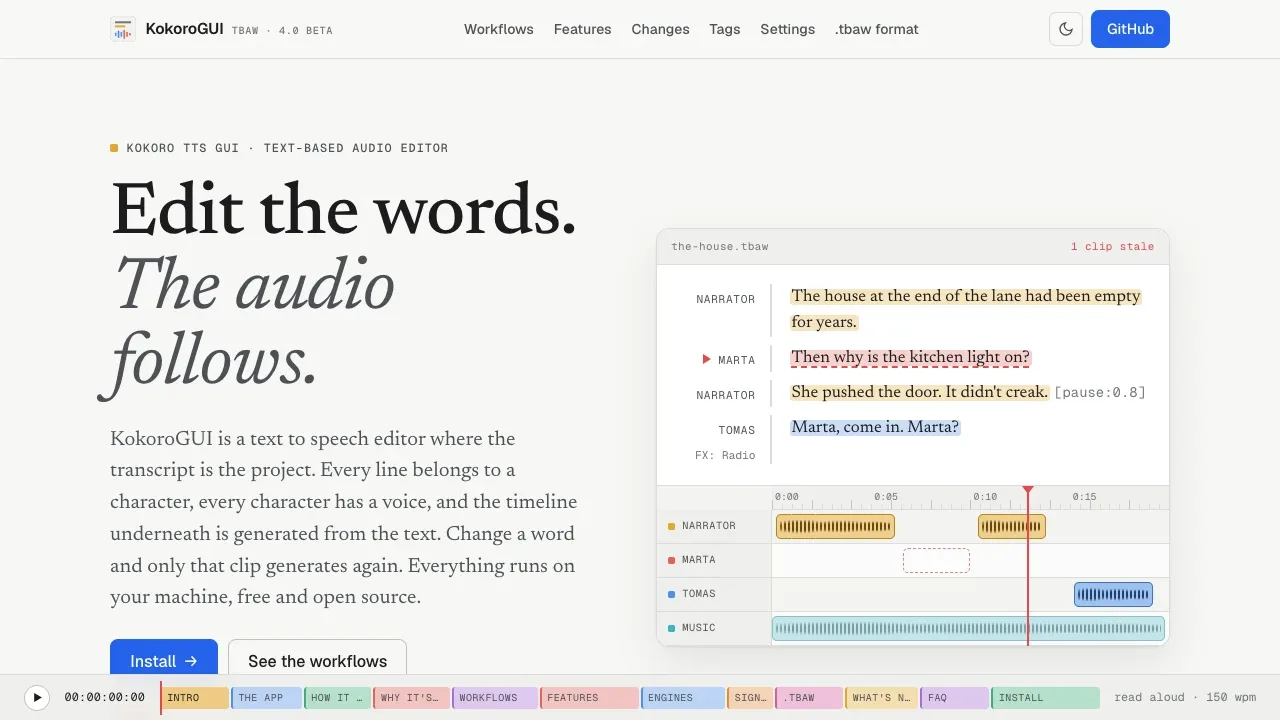
KokoroGUI is a desktop audio editor for people making audiobooks, dubbed videos, podcasts or game dialogue. It connects a written script to generated speech, so revising a line doesn't mean generating the whole recording again.
- Script and voices. Import text, PDF or EPUB files, assign speakers and combine Kokoro's built-in or mixed voices with Audio8 voice clones in the same project.
- Transcript editing. Generate speech from individual lines, or transcribe an existing recording with Whisper and cut its audio by deleting words.
- Dubbing. Turn subtitle cues into timed clips, fit speech to each slot and compare the dub with the original audio while a reference video plays.
- Mixing. Arrange clips across tracks, add fades and effects, and use music beds that lower their volume during speech; effect adjustments don't require fresh speech generation.
- Review and export. Keep alternate takes, approval status and notes, then export mixed audio or individual clips with subtitles and a cue sheet. Portable .tbaw projects can include text, audio, voices and presets.
It's free and open source under Apache-2.0, and runs on Windows, macOS and Linux. Models download from Hugging Face before first use; generation then works offline on your CPU or GPU, without an account or audio uploads. A GPU is optional. Kokoro supports American and British English, Spanish, French, Italian, Portuguese, Japanese and Chinese. Audio8 clones voices from a short WAV recording and its transcript, and its model has separate licensing terms.
 Logotyper


