
M3E Canvas
A browser-based UI design tool that turns Material 3 Expressive layouts into prompts for AI coding assistants, with a free, MIT-licensed static app.
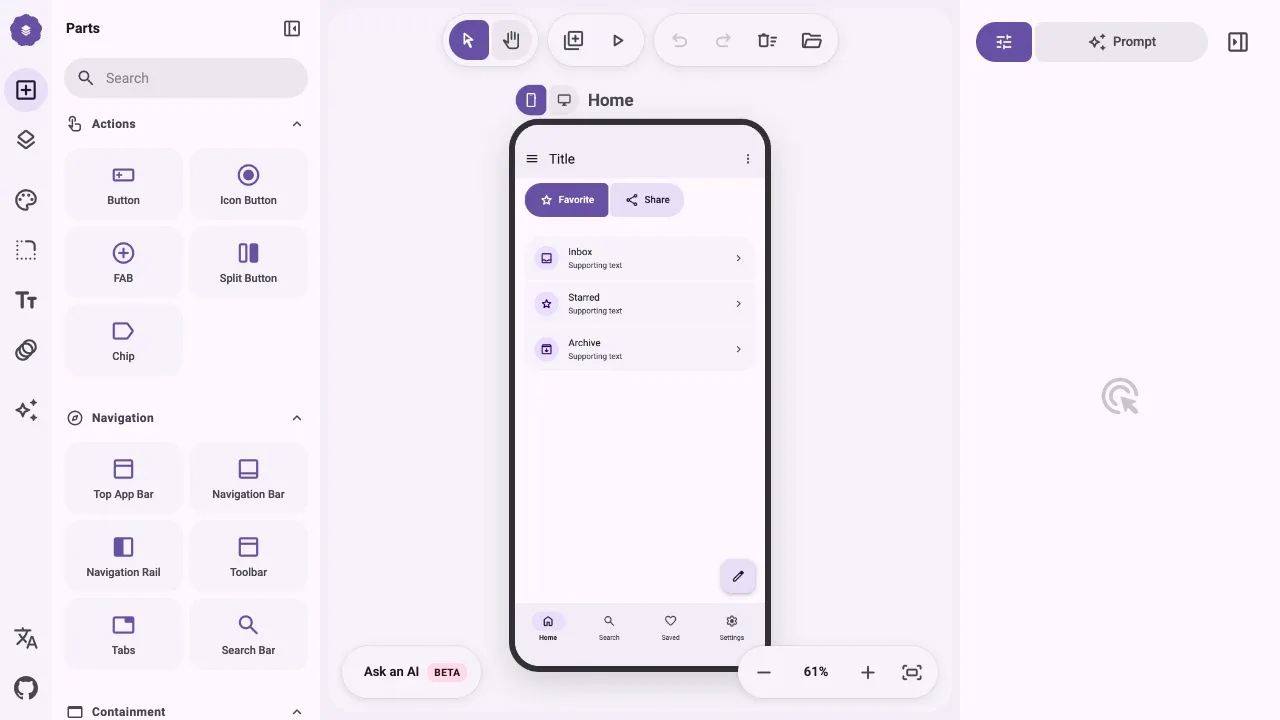
M3E Canvas is a visual editor for people planning Material 3 Expressive apps with an AI coding assistant. It lets you sketch screens and test their flow before handing a text prompt to a tool such as Claude Code, Codex, Gemini CLI or Cursor.
- Coding prompts: Turn your design into a prompt that describes layout relationships, including overlapping elements and side-by-side rows, for any coding tool that accepts text prompts.
- Material components: Build screens with draggable buttons, forms, cards, navigation elements and animated loading indicators, with layers and groups for arranging overlapping parts.
- Phone and desktop layouts: Keep both screen sizes in one design, with navigation adapting between a bar and a rail and matching screen names represented as two widths of one interface in the prompt.
- Interactive previews: Connect screens through taps and swipes, preview their transitions and test toggle buttons that change their icon and style.
- Themes: Adjust Material color schemes, light or dark appearance, contrast, corner shapes, typography and motion, including colors derived from a seed color.
The editor runs in a browser and is available as a public hosted app or a static site you can self-host. It's free and open source under the MIT license. Its output is a design prompt; a separate AI coding tool generates the app.
 Logotyper


